Email Marketing Automation: The Technical Deep Dive for Growth Teams
Most guides to email marketing automation stop at “set up a welcome sequence and an abandoned cart email.” That’s useful advice, but it barely scratches the surface of what a well-engineered email automation system can do. For growth teams that want to build systems that actually move the needle — recovering churned users, converting trial users at scale, re-engaging dormant segments — a deeper technical understanding of how email automation works is essential.
This guide is for marketing engineers, technically-inclined marketing managers, and startup founders building their first serious automation stack. We cover the architecture behind email automation, deliverability engineering, behavioral trigger design, advanced workflow patterns, and the measurement framework that tells you whether your automations are working.
Email Automation Architecture
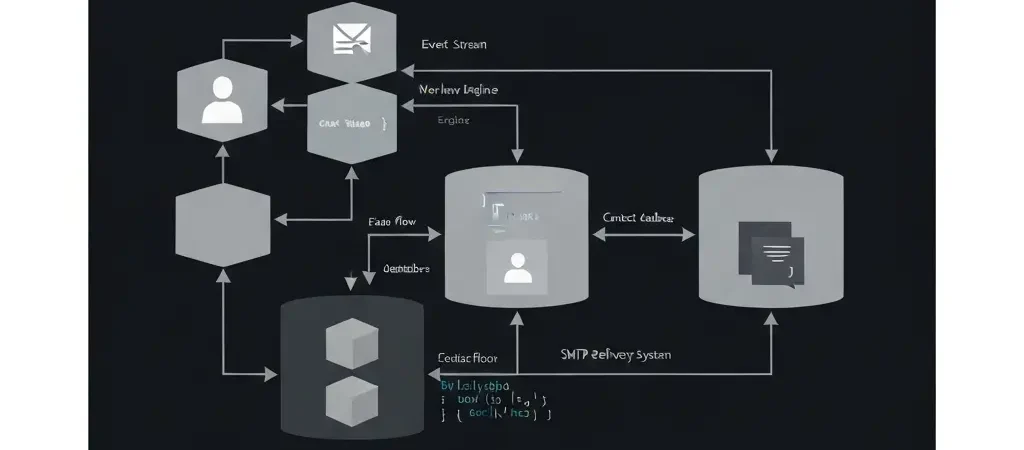
Understanding the technical architecture of email marketing automation helps you make better platform choices and diagnose issues when they arise. At its core, an email automation system has five components:
1. Contact Data Store
Your database of contacts with their attributes (name, email, company, location) and custom fields (plan type, product usage, cohort). The quality of your contact data directly determines the sophistication of automation you can run. In CampaignOS, this is a PostgreSQL database with a flexible custom field schema.
2. Event Stream
Behavioral events from your product, website, and email interactions. These trigger automation workflows. Events include: email_opened, link_clicked, page_visited, form_submitted, product_activated, trial_expired, purchase_completed. Events carry properties (which page? which product feature? which link?). The richer your event stream, the more sophisticated your triggers can be.
3. Workflow Engine
The automation logic layer that evaluates triggers and conditions, then executes actions. Modern workflow engines are event-driven and process asynchronously via a queue (CampaignOS uses Redis). This means a contact’s action at 2am triggers their automation sequence without any manual intervention.
4. Sending Infrastructure
The system that takes a workflow action (“send email to contact X with template Y”) and actually delivers the email. This involves template rendering, personalization merge, queuing to SMTP provider, and handling responses (bounces, opens, clicks).
5. Analytics Layer
Aggregates event data and email interaction data into the reporting UI. Calculates open rates, CTRs, workflow conversion rates, and revenue attribution.
Behavioral Trigger Design
The difference between mediocre email automation and high-performing email automation is almost entirely in trigger quality. Time-based triggers (“send 3 days after signup”) are table stakes. Behavioral triggers — responding to what a contact actually does — drive dramatically higher engagement and conversion rates.
Event-Based Triggers
Fire when a specific event occurs: user completes a product tour step, visits the pricing page, submits a support ticket, reaches a usage threshold. These triggers create timely, contextually relevant emails. A user who visits your pricing page right now is more likely to convert on a well-timed email today than on any scheduled campaign.
Absence Triggers
Fire when an expected event does NOT occur within a time window. “User signed up but hasn’t activated within 48 hours” — trigger an activation help email. “Trial user hasn’t logged in this week” — trigger a re-engagement sequence. Absence triggers catch contacts who are drifting away before they actually churn.
Threshold Triggers
Fire when a metric crosses a threshold: lead score reaches 50, contact has opened 5 emails in 30 days, contact’s account usage drops below 20% of previous month. These triggers require your platform to support calculated fields and aggregate event queries, not just simple event lookups.
Segment Entry/Exit Triggers
Fire when a contact enters or exits a dynamic segment. “Contact enters ‘power user’ segment” — trigger an upsell sequence. “Contact exits ‘active trial’ segment” — trigger a win-back sequence. CampaignOS’s dynamic segmentation engine evaluates segment membership in real time as contact attributes change.
Deliverability Engineering
Email deliverability is a technical discipline, not just a policy concern. Here’s what you need to get right:
Authentication (SPF, DKIM, DMARC)
These DNS records prove to receiving servers that your email is legitimate:
- SPF: Lists which IP addresses are authorized to send email from your domain
- DKIM: Cryptographically signs outgoing emails, allowing receivers to verify they weren’t tampered with
- DMARC: Tells receivers what to do with emails that fail SPF or DKIM checks (reject, quarantine, or report)
All three must be configured correctly. DMARC in at minimum p=quarantine is now required by Gmail and Yahoo for bulk senders. Skip DMARC and your emails will increasingly end up in spam.
IP Reputation and Warm-Up
New dedicated IPs start with no reputation. Sending high volume immediately results in filtering. Warm-up involves gradually increasing send volume over 4–6 weeks: 200 emails/day in week 1, 1,000/day in week 2, 5,000/day in week 3, and so on. Most SMTP providers (Amazon SES, Postmark) provide warm-up guidance. CampaignOS’s sending configuration supports scheduled warm-up plans.
List Hygiene
Your sender reputation is directly affected by your bounce rate and spam complaint rate. Maintain bounce rates below 2% and complaint rates below 0.1%. This requires:
- Verified double opt-in to prevent fake addresses
- Immediate hard bounce removal (permanent failures)
- Suppression list management for unsubscribes and complaints
- Regular engagement-based suppression (suppress contacts who haven’t opened in 180+ days)
Content and Engagement Signals
Modern spam filters analyze engagement patterns, not just content keywords. Consistently high engagement (opens, clicks, replies) tells providers your emails are wanted. This is why the most reliable deliverability strategy is to earn it: send relevant emails to engaged contacts, not bulk campaigns to entire lists.
Sequence Architecture Patterns
Well-designed automation sequences follow established patterns. Here are the most effective ones:
The Activation Sequence
Objective: get new signups to experience the core value of your product. Structure: email 1 (immediate) — welcome + activation step 1; email 2 (day 2, only if not activated) — help completing activation; email 3 (day 5, only if still not activated) — social proof + activation prompt; email 4 (day 10, only if still not activated) — offer to talk to a human. Branching at each step is critical — don’t send “haven’t activated yet” emails to people who have.
The Nurture Sequence
Objective: build trust and move leads toward purchase over time. Structure: 6–10 emails over 30–60 days, each delivering standalone value (how-to content, case studies, comparison content), with progressive intensity of CTAs. The sequence adapts based on engagement — active clickers get accelerated; non-openers get a re-subject-line branch.
The Re-engagement Sequence
Objective: win back dormant contacts before sunsetting them. Structure: email 1 — “we miss you” with a compelling reason to return; email 2 (if no open, day 7) — different subject line + social proof of recent improvements; email 3 (if no open, day 14) — last chance offer or survey; suppress from list if no engagement after email 3.
Personalization at Scale
Personalization beyond first-name merge is where automation creates compounding returns. In CampaignOS, personalization variables draw from any contact field or computed value:
- Behavioral personalization: “You’ve used [feature] 5 times — here’s how to get even more from it”
- Industry personalization: Different email body for contacts tagged as SaaS vs. e-commerce vs. nonprofit
- Lifecycle personalization: Trial users, active customers, and churned customers get different versions of the same campaign
- Dynamic content blocks: Conditionally show/hide email sections based on contact attributes
The key to personalization at scale is maintaining clean, structured contact data. Contacts need accurate industry, company size, and product usage data for behavioral personalization to work. Investing in contact enrichment and clean data pipelines pays dividends across every campaign you run.
Testing and Optimization
Email automation is not set-and-forget. A continuous testing program extracts compounding improvements from your existing traffic:
Subject Line A/B Testing
The highest-leverage test. A 10% improvement in open rate compounds across every email in the sequence. Test one variable at a time (curiosity gap vs. direct benefit, personalized vs. generic, short vs. long). Minimum 1,000 recipients per variant for statistical significance.
Send Time Testing
Does your audience open more at 9am or 2pm? On Tuesday or Thursday? For behavioral triggers, this is less relevant — send as soon as possible after the trigger. For scheduled broadcasts, send time optimization can improve open rates 5–15%.
Sequence Branch Testing
Test different branching logic: does suppressing non-openers after email 3 improve downstream conversion, or does persisting longer work better? Test with a 50/50 split and measure 30-day conversion rates, not just open rates.
Measurement Framework
Vanity metrics (open rates, click rates) tell you about engagement but not business impact. Build a measurement framework that connects email automation to outcomes:
| Metric | What it measures | Target benchmark |
|---|---|---|
| Open rate | Subject line quality, sender reputation | 25–40% (behavioral sequences) |
| Click-to-open rate | Email content relevance | 15–25% |
| Conversion rate | Email to desired action | 2–8% (depends on action) |
| Revenue per email | Direct business impact | Varies; track trends over time |
| Unsubscribe rate | Content relevance, frequency fit | <0.5% |
| Spam complaint rate | Deliverability health | <0.1% |
Advanced Patterns
Predictive cohort modeling: Segment new contacts by predicted behavior based on acquisition source, initial engagement, and signup data. Route different predicted cohorts into different automation sequences from day one.
Churn prediction sequences: Use engagement drop-off patterns (login frequency decline, feature usage reduction) to predict churn 30–60 days before it happens. Trigger retention sequences automatically when risk scores cross thresholds.
Revenue expansion automation: For SaaS products, track feature adoption against plan tier. When usage approaches plan limits, trigger contextual upsell sequences that show value before asking for the upgrade.
Platforms like IQuitNow’s health behavior platform apply these exact patterns to drive habit formation — using behavioral triggers and multi-channel sequences to deliver the right intervention at the right moment. This is built with Authenova’s content automation infrastructure demonstrating that sophisticated automation approaches apply equally to content and campaign systems. For EdTech platforms like Tesify, similar behavioral automation sequences drive student completion rates and subscription renewals.
Build Your Email Automation Stack with CampaignOS
CampaignOS gives you the behavioral event infrastructure, workflow engine, and deliverability tooling to build sophisticated email automation — free and open source.
Frequently Asked Questions
What’s the difference between email marketing and email marketing automation?
Email marketing typically refers to sending batch campaigns — newsletters, promotions, announcements — to a list. Email marketing automation adds behavioral triggers and workflow logic, sending emails in response to what individual contacts do (or don’t do). Automation is more complex to set up but delivers higher relevance and better conversion rates than batch campaigns.
How do I improve email deliverability for automated sequences?
The most important steps: (1) configure SPF, DKIM, and DMARC correctly for your sending domain; (2) use a reputable SMTP provider with a good sending IP reputation; (3) maintain clean lists by removing hard bounces immediately and suppressing long-term non-openers; (4) earn high engagement by sending relevant, behavioral-trigger-based emails rather than bulk blasts; (5) warm up new IP addresses gradually before sending at full volume.
What is a behavioral trigger in email automation?
A behavioral trigger fires an automation action when a contact performs (or fails to perform) a specific action: visiting a pricing page, completing a form, reaching a usage threshold, or not logging in for 7 days. Unlike time-based triggers that fire on a schedule, behavioral triggers respond to what contacts actually do, making the resulting emails more relevant and timely.
How many emails should be in an automated sequence?
There’s no universal answer — it depends on your sales cycle and audience. Welcome sequences typically have 3–7 emails over 2 weeks. Nurture sequences for considered purchases might have 8–12 emails over 60 days. Re-engagement sequences typically have 3 emails with exit logic. The key principle: every email in the sequence should deliver standalone value and have clear exit logic (if the contact converts, stop the sequence).
Can CampaignOS handle complex behavioral triggers?
Yes. CampaignOS supports event-based triggers, absence triggers (fire when an event doesn’t occur within a window), segment entry/exit triggers, and lead score threshold triggers. You can send custom behavioral events from your product via the API, which then drive automation workflows. The workflow engine is asynchronous and processes triggers in real time via Redis queuing.