How Does Email Marketing Automation Work Step by Step?
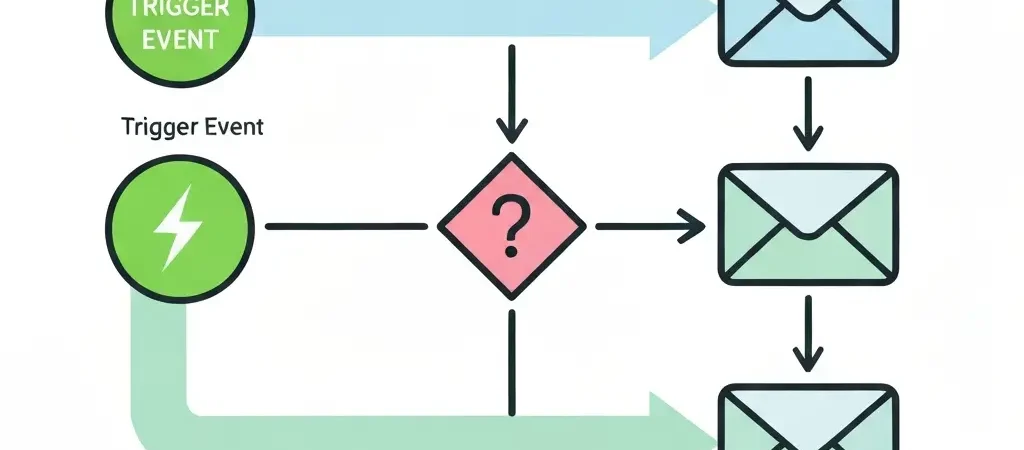
Email marketing automation works through three sequential components: a trigger (the event that starts the workflow), a condition (the branching logic that determines who gets which message), and an action (the email or other output delivered as a result). The platform monitors contact behavior continuously, evaluates triggers against defined rules, and dispatches personalized messages without manual intervention. Automated emails generate 320% more revenue than non-automated campaigns (Campaign Monitor, 2025) because this trigger-condition-action model delivers the right message at the moment of highest intent — something batch-send campaigns cannot replicate.
What are the core components of email automation?
Every email automation workflow — regardless of complexity — is built from three components that operate in sequence.
Triggers. A trigger is any defined event that starts a workflow. Triggers can be contact-initiated (a form submission, a purchase, a page visit), time-based (a contact’s birthday, a renewal date, 30 days since signup), or data-based (a lead score crossing a threshold, a custom field value changing).
Conditions. After a trigger fires, the workflow evaluates conditions to determine which path applies. A condition checks contact data: “Has this contact made a purchase before?” If yes, the workflow branches toward a returning-customer sequence. If no, it routes to a first-purchase sequence. Conditions can check any data in the contact’s profile — demographics, behavior, engagement history, custom fields, or lead score.
Actions. An action is the output the workflow executes: sending an email, waiting a defined time period, updating a contact field, adding or removing a tag, assigning a lead score, notifying a sales rep, or triggering a webhook to an external system. Actions are the visible result of the trigger-condition evaluation cycle.
What types of triggers start an email automation?
Triggers fall into four categories. The highest-revenue automations use behavioral triggers — they fire at the moment of peak intent rather than on a predetermined schedule.
| Trigger Type | Examples | Best Used For |
|---|---|---|
| Behavioral | Page visit, cart add, content download, email click | Conversion and re-engagement |
| Form-based | Newsletter signup, contact form, lead magnet download | Welcome and onboarding sequences |
| Transactional | Purchase, subscription, renewal, cancellation | Post-purchase and retention |
| Date-based | Birthday, anniversary, renewal date, inactivity period | Lifecycle and retention campaigns |
A contact contacted within five minutes of a behavioral trigger is 21 times more likely to convert than one contacted after 30 minutes (MIT/Velocify). This is the single most important reason to use behavioral triggers over scheduled campaigns — the timing advantage alone produces dramatically higher conversion rates.
How do conditions and branching logic work?
Conditions are if/then statements evaluated against contact data at the moment the trigger fires. A single workflow can contain multiple condition branches, creating personalized paths for different contact segments without building separate campaigns for each.
A typical condition evaluates: “Is [contact field/behavior] equal to / greater than / contains [value]?” Examples:
- If contact tag contains “purchased” → send post-purchase sequence. Else → send first-time buyer offer.
- If email opened within 24 hours → continue to next step. Else → send SMS follow-up.
- If lead score is greater than 50 → alert sales rep. Else → continue nurture sequence.
- If contact is in segment “enterprise” → send case study. Else → send SMB pricing guide.
Conditions can also introduce time delays — “wait 48 hours, then evaluate whether the contact has clicked.” This wait-and-check pattern is the foundation of multi-step nurture sequences and re-engagement campaigns.
What actions can an email automation workflow perform?
Actions are the outputs a workflow executes. Most people think of actions as just “send an email,” but modern automation platforms support a broader action set that extends the value of each workflow trigger.
- Send email. The core action. Personalized with contact-specific merge fields, dynamic content blocks, and behavioral context from the trigger.
- Wait. Pauses the workflow for a defined period (hours, days) or until a specific date, then proceeds to the next step.
- Update contact. Changes a field value, adds or removes a tag, updates the contact’s lifecycle stage, or adjusts their lead score.
- Add to / remove from list or segment. Manages which lists a contact belongs to as they move through the funnel.
- Send notification. Emails or Slack notifications to internal team members — typically used for sales alert automations when a lead score threshold is crossed.
- Trigger webhook. Sends data to an external system — CRM, Slack, Zapier, or a custom API endpoint. Enables cross-platform automation without native integrations.
- End workflow. Exits the contact from the workflow, preventing repeated entry or conflicting automations from running simultaneously.
Step-by-step: How does a welcome series automation work?
A welcome series is the highest-engagement automation in most email programs. New subscribers are most active in the first 48–72 hours after signup — a welcome series captures this attention window systematically.
- Trigger: Contact submits a signup form and is added to the “New Subscribers” list.
- Immediate action: Welcome email fires within 60 seconds. Subject line confirms the subscription and delivers any lead magnet promised. Open rates for immediate welcome emails average 50–60% — 3–4x the industry average for promotional emails.
- Wait 24 hours.
- Condition: Did the contact open the welcome email? If yes, branch A (engaged path): send a content or value email demonstrating product/service benefit. If no, branch B (unengaged path): send a second welcome with different subject line — subject line A/B test for the unengaged.
- Wait 48 hours.
- Action: Send a social proof email — testimonials, case studies, or usage statistics that build credibility.
- Wait 48 hours.
- Action: Send a conversion email — a specific offer, free trial prompt, or low-commitment CTA. This is the monetization step of the welcome series.
- Action: Update contact lifecycle stage to “Engaged” or “Prospect” based on engagement. Remove from welcome series. Add to ongoing newsletter or product list.
Step-by-step: How does an abandoned cart automation work?
Abandoned cart recovery is the highest-revenue automation for e-commerce businesses. Average cart abandonment rates exceed 70% (Baymard Institute, 2025). A three-step automated recovery sequence captures 15% of that abandoned revenue on average.
- Trigger: Contact adds items to cart but does not complete checkout within 60 minutes. This requires cart tracking code on the website to detect the abandonment event.
- Action (1 hour post-abandonment): First cart abandonment email. Shows the exact products left in the cart using dynamic content. Low-pressure copy: “You left something behind.” No discount — test urgency without margin sacrifice first.
- Wait 23 hours.
- Condition: Did the contact purchase? If yes, exit workflow and start post-purchase sequence. If no, continue.
- Action (24 hours post-abandonment): Second email. Adds social proof — reviews of the abandoned product. May introduce a small incentive (free shipping, 5% discount) if margin supports it.
- Wait 48 hours.
- Condition: Did the contact purchase? If yes, exit. If no, continue.
- Action (72 hours post-abandonment): Final email. Urgency-framed subject line. Expiring offer if discount was introduced. Last opportunity before the cart is cleared from the automation.
- Action: If no purchase after all three emails, remove from cart sequence. Add to standard re-engagement segment for future promotional campaigns.
Step-by-step: How does a lead nurturing automation work?
Lead nurturing automations move contacts from awareness to sales-readiness over a defined period. They are the primary mechanism through which companies achieve a 451% increase in qualified leads relative to non-automated approaches.
- Trigger: Contact downloads a lead magnet (ebook, checklist, webinar recording) or fills out a contact form. Entry into the nurture sequence is triggered, and lead score starts at 10.
- Action (Day 1): Delivery email with the requested content. No pitch. Subject line is purely functional: “Your [Resource Name] is inside.”
- Wait 3 days.
- Action (Day 4): Educational email related to the topic of the lead magnet. Provides standalone value. No CTA beyond “reply if you have questions.” Lead score +5 if email is opened.
- Wait 4 days.
- Action (Day 8): Case study or customer story email. Shows real outcomes from using your product/service. CTA: “See how [Company] achieved [Result].” Lead score +5 if clicked.
- Wait 5 days.
- Action (Day 13): Problem-agitation email. Names the specific pain point the lead magnet addressed. CTA: soft product mention. Lead score +10 if clicked.
- Condition: Is lead score above 40? If yes, alert sales rep and move contact to “Sales-Ready” segment. If no, continue nurture.
- Action (Day 20): Direct offer email. Free trial, demo booking, or consultation CTA. Clear, low-friction offer. Lead score +15 if clicked.
- Action: Contacts who click the offer CTA move to sales pipeline. Contacts who do not move to monthly newsletter segment for long-term nurturing.
How does automation personalize emails at scale?
Email automation personalizes messages through four mechanisms that operate on the contact’s stored data at the moment of send.
Merge fields. Any field in the contact’s profile — first name, company name, last purchase date, location — can be inserted into the email body or subject line dynamically. “Hi [First Name], your order from [Last Purchase Date] is ready to repeat” is generated individually for each recipient.
Dynamic content blocks. Sections of the email body can be shown or hidden based on contact segment, tag, or field value. A single email template can display different product recommendations, testimonials, or CTAs to different segments without creating multiple campaigns.
Behavioral context from trigger data. When a workflow is triggered by a specific behavior — a page visit, a product view, a cart add — that behavioral context can be passed into the email. An abandoned cart email that shows the exact products the contact added to their cart uses this mechanism.
Send time optimization. Advanced platforms analyze each contact’s historical open behavior and schedule the email to arrive at the time they are most likely to engage. This can increase open rates by 10–20% without changing content.
How does CampaignOS implement email automation?
CampaignOS provides a visual workflow builder where every trigger, condition, and action is represented as a connected node. You build email automation workflows by dragging and connecting elements — no code required. The platform includes pre-built templates for the most common workflows: welcome series, abandoned cart, lead nurturing, post-purchase sequences, and re-engagement campaigns.
All contact data — behavioral events, email engagement, purchase history — flows into a unified contact profile that every workflow can access for conditions and personalization. CampaignOS is free to start at app.campaignos.site.
For related reading, see What Is Email Automation? Complete Definitions and Examples for 2026, Email Marketing Best Practices 2026, and How to Set Up Marketing Automation: Advanced Triggers, Lead Scoring, and Multi-Channel Workflows.
Frequently Asked Questions
What is an email automation trigger?
An email automation trigger is any defined event that starts a workflow. Triggers can be behavioral (a page visit, cart add, or email click), form-based (a signup or contact form submission), transactional (a purchase or subscription), or date-based (a contact’s birthday or a renewal date). When the trigger event occurs, the automation platform fires the associated workflow immediately or after a defined delay.
How does email automation know what to send each contact?
Email automation uses conditional branching logic — if/then statements evaluated against the contact’s stored data — to determine which email each contact receives. Conditions can check any field: purchase history, email engagement, lead score, demographic data, or behavioral tags. A single workflow can produce dozens of different email outcomes based on these conditions, personalizing the message without building separate campaigns.
How long does it take to set up an email automation workflow?
A basic trigger-based automation (single trigger, one or two emails, no conditional branching) takes 30–60 minutes to set up on a platform with a visual builder. A full welcome series with branching logic takes 2–4 hours. A complete lead nurturing sequence with lead scoring takes 4–8 hours to configure, test, and activate. The setup time is a one-time investment — the workflow then runs automatically for every qualifying contact.
What is the most effective email automation workflow?
The abandoned cart recovery workflow consistently delivers the highest direct revenue per setup hour for e-commerce businesses, with an average 15% recovery rate on abandoned cart value. For SaaS and service businesses, trial-to-paid conversion workflows deliver the highest revenue impact. For list monetization across all business types, a welcome series with a conversion email at step 4 delivers the best email program ROI.
Can email automation workflows run simultaneously for the same contact?
Yes, and managing this is critical. A contact can technically be in a welcome series, an abandoned cart sequence, and a lead nurturing workflow at the same time. Good automation practice sets workflow priority rules and exclusion conditions — for example, a contact who purchases during an abandoned cart sequence should exit the cart workflow immediately and enter the post-purchase workflow instead. Failing to manage concurrent workflows leads to contradictory messaging and unsubscribes.
How does email automation handle contacts who don’t engage?
Non-engagement is handled through conditional branching and re-engagement automations. Within a workflow, a contact who does not open an email within 48 hours can be routed to an alternative branch — a different subject line, an SMS follow-up, or a simpler offer. Contacts who remain unengaged after a full sequence should enter a formal re-engagement workflow: a 3-email series with a clear opt-out option for those who do not re-engage, protecting list health and deliverability.
What is the difference between email automation and drip campaigns?
Drip campaigns are a subset of email automation. A drip campaign sends a fixed sequence of emails on a predetermined schedule, regardless of contact behavior — email 1 on day 1, email 2 on day 3, email 3 on day 7. Email automation adds behavioral responsiveness on top: the sequence branches based on what the contact does, adapts timing to engagement signals, and can switch channels or trigger other actions based on real-time behavior. Drip campaigns are time-based; email automation is behavior-based.
Does email automation work without a large contact list?
Yes. Email automation is more valuable at small list sizes than large ones because each contact represents a higher proportion of total revenue potential. A 500-person list that has never had a welcome series or abandoned cart recovery is leaving significant revenue on the table. The setup cost of automation is fixed regardless of list size — the ROI is actually higher on smaller lists because the incremental revenue per contact is more significant to total business revenue.
How does email automation affect email deliverability?
Properly implemented email automation improves deliverability by increasing engagement signals — higher open rates, click rates, and reply rates — that inbox providers use to determine sender reputation. Behavioral triggers ensure emails are relevant, which reduces spam complaints and unsubscribes. However, automation can damage deliverability if it sends too frequently to unengaged contacts. Re-engagement workflows and sunset policies that remove chronic non-openers protect list health and maintain deliverability over time.
CampaignOS provides a visual workflow builder, behavioral triggers, and pre-built automation templates — free to start. Set up your welcome series in under an hour.