How to Create an Email Drip Campaign for SaaS: Templates, Timing, and Conversion Tactics
Knowing how to create an email drip campaign is essential for any SaaS business trying to convert trial users into paying customers — but most drip campaigns underperform because they follow a template designed for e-commerce, not software. SaaS drip campaigns need to do something fundamentally different: guide users to their first meaningful moment of value (activation) before pushing any conversion message. Push too early and you lose them. Push too late and they have already churned mentally. This guide shows you exactly how to structure a SaaS drip campaign that converts.
An email drip campaign (also called a drip sequence or automated email sequence) is a series of pre-written emails sent to subscribers on a schedule or triggered by specific behaviour. For SaaS, the most critical drip campaigns are the trial onboarding sequence (days 1–14), the trial expiry sequence (days 12–21), and the post-conversion sequence (days 1–30 after upgrade). We will cover all three.
Step 1: Define Your Activation Milestone
Before you write a single email, you need to identify your product’s activation milestone: the specific action inside your product that correlates most strongly with long-term retention. For most SaaS products, this is the moment a user first experiences the core value proposition — not just signing up, but actually using the feature that makes your product worth paying for.
Common activation milestones by product type:
- Email marketing platform: First campaign sent and received by at least 10 subscribers
- Project management tool: First project created with at least 3 tasks assigned to team members
- Analytics platform: First custom dashboard created with real data
- CRM: First pipeline populated with at least 5 deals and first email sent from the platform
For CampaignOS, activation is the moment a user sends their first automated campaign and sees real subscriber data flowing into their dashboard. Everything in the onboarding drip sequence is oriented toward getting the user to that milestone as quickly as possible.
To identify your activation milestone, analyse your cohort data: what action do users who stay long-term all have in common within the first 7 days that users who churn do not?
Step 2: Map Your Sequence Structure
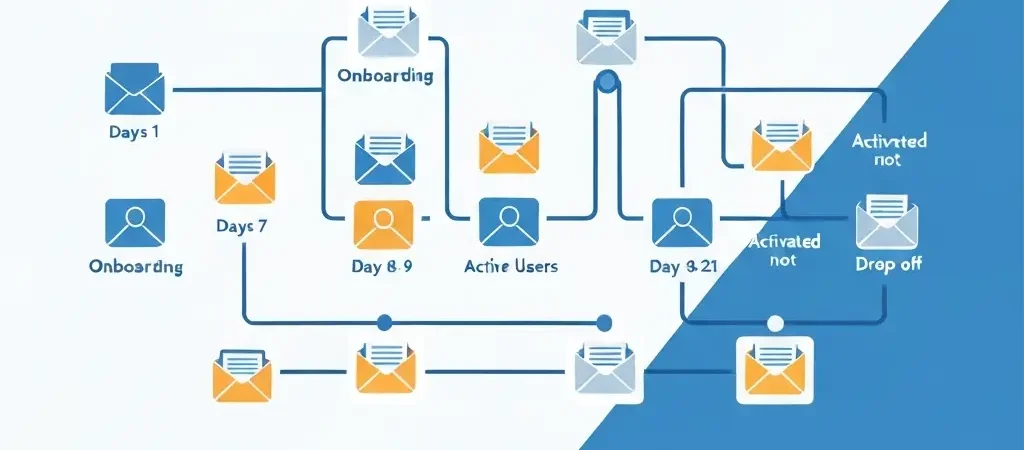
A high-performing SaaS trial drip campaign has three phases:
Phase 1: Orientation (Days 1–3)
Goal: Help the user understand what the product does and what their immediate next step is. Do not overwhelm — one action per email.
Phase 2: Activation Drive (Days 4–10)
Goal: Get the user to their activation milestone. These emails are the most behaviorally responsive — if the user has already activated, they should receive entirely different content (congratulations + next steps) than non-activated users (tutorial + support offer).
Phase 3: Conversion (Days 11–21)
Goal: Convert activated trial users to paid. Only send conversion messaging to users who have reached activation. Users who have not activated need re-engagement, not pricing pitches.
| Day | Goal | Branch | |
|---|---|---|---|
| 0 (signup) | Welcome + first action | Get them into the product | None |
| 1 | Quick win tutorial | Complete one meaningful action | None |
| 3 | Feature spotlight | Drive toward activation milestone | Activated / Not activated |
| 5 | Social proof / case study | Show what success looks like | Activated / Not activated |
| 7 | Check-in / help offer | Surface blockers | Not activated only |
| 10 | Results showcase | Reinforce value, introduce upgrade | Activated only |
| 14 | Trial midpoint | Clear upgrade CTA with pricing | Activated → pricing; Not → re-activation |
| 18 | Objection handler | Address price / complexity concerns | Not yet converted |
| 21 | Trial expiry warning | Last chance urgency | Not yet converted |
Step 3: Write the Emails (With Templates)
Welcome Email (Day 0)
Send immediately after signup. This email has the highest open rate of the entire sequence — do not waste it on pleasantries.
Hi [FirstName],
Welcome to [Product]. Your account is live.
Most users who get real value from [Product] complete one action in their first hour: [specific activation action]. Takes about 5 minutes.
[Button: Do it now →]
If you have any questions, reply to this email — I read every response.
[Founder/Team Name]
Check-In Email (Day 7, non-activated users)
Hi [FirstName],
You signed up for [Product] a week ago, and I noticed you have not [completed activation milestone] yet.
That’s usually a sign of one of three things:
1. You haven’t had time yet (totally fine)
2. Something is confusing or broken (please tell me)
3. It’s not the right fit (also fine — I’d rather know)
Which one is it? Just reply with “1”, “2”, or “3” — I’ll take it from there.
[Name]
This single-question email consistently generates the highest reply rate of any email in the sequence. The responses are invaluable for product and onboarding improvement.
Step 4: Set Timing and Triggers
For SaaS drip campaigns, a combination of time-based and behaviour-based triggers works better than purely one or the other:
- Day 0: Triggered immediately on account creation (real-time webhook trigger, not batch send)
- Day 1: 24 hours after account creation (time delay from trigger)
- Day 3: Wait condition — send 3 days after signup OR when the user logs in for the second time, whichever comes first
- Day 7 check-in: Conditional — only send if the user has not yet reached the activation milestone
- Trial expiry emails: Trigger when the trial end date is less than 7 days away (calculated dynamically)
Send all emails at the optimal time in the user’s local time zone rather than a fixed UTC time. For B2B SaaS, this is typically 8–9am on weekdays. For consumer SaaS, evenings and weekends often perform comparably.
Step 5: Add Behavioural Branching
The activation branch is the most important in your sequence. After each email, check whether the user has reached activation:
- Activated: Skip remaining tutorial emails. Move to the conversion track. Send social proof, results stories, and pricing.
- Not activated: Continue the onboarding track. Increase the support offer. Consider a personal outreach trigger if the lead score is high.
Also branch on email engagement:
- If they click the CTA in email 3 but do not complete the action: send a follow-up within 24 hours addressing the specific barrier at that step
- If they do not open 3 consecutive emails: skip to the re-engagement email rather than continuing the sequence into an unresponsive inbox
The Trial Expiry Sequence
The 7 days before trial expiry are your highest-leverage conversion window. Users are most motivated by urgency at this point, but only if they have experienced value. The expiry sequence for activated users:
- 7 days before expiry: “Your trial ends in 7 days — here’s what you’ll lose” (focus on specific features/limits)
- 3 days before expiry: “Still thinking? Here’s what other [industry] teams did” (case study)
- 1 day before expiry: “Your trial expires tomorrow — upgrade in 2 minutes” (friction-free CTA)
- Day of expiry: “Last day” with direct upgrade link
For non-activated users, the expiry sequence focuses on reactivation, not conversion: “You still have 7 days — let’s make them count” with a personal offer of a 1:1 onboarding session or extended trial.
The Post-Conversion Drip
Most SaaS teams stop emailing aggressively after a user converts, which is a mistake. The first 30 days after upgrade are critical for retention. Build a post-conversion drip that:
- Day 0: Celebrates the upgrade and clarifies what changes now (features unlocked, limits increased)
- Day 3: Introduction to advanced features relevant to their use case
- Day 7: “7 days in — you’ve done [X]. Here’s your next milestone.”
- Day 14: Invites them to a community, webinar, or customer success resource
- Day 30: Reviews and advocacy request — the highest-engagement moment for a review request is 30 days after a positive experience, not immediately after purchase
For more on building these sequences, see our guide to building lead nurture sequences and writing a welcome email sequence. For research on SaaS marketing automation best practices, see Customer.io’s SaaS lifecycle segmentation guide.
How to Measure and Optimise
Track these metrics for every drip sequence:
- Activation rate: What percentage of trial users reach the activation milestone? (Benchmark: 25–40% is healthy for most SaaS)
- Trial-to-paid conversion rate: Of all trial users, what percentage converts? (Benchmark: 5–25% depending on pricing and product complexity)
- Drop-off by email: Where in the sequence do users stop engaging? That step needs rewriting.
- Reply rate on check-in email: High reply rates signal a healthy relationship; low reply rates signal irrelevance or poor targeting.
- Revenue per trial started: The ultimate efficiency metric for the entire drip programme
Frequently Asked Questions
How many emails should a SaaS drip campaign have?
A typical SaaS trial drip campaign runs 8–12 emails over 21 days. The exact number depends on your trial length (14-day trials need a more compressed sequence than 30-day trials) and your product complexity. More important than the number is the structure — orientation emails first, activation drive in the middle, conversion messaging only after activation is confirmed.
What is an activation milestone and why does it matter for drip campaigns?
An activation milestone is the specific action inside your product that correlates most strongly with long-term retention and conversion. It is the moment a user first experiences the core value your product delivers. Drip campaigns that drive users toward activation before sending conversion messaging consistently outperform those that follow a generic schedule — because they pitch the upgrade at the moment the user has experienced why the product is worth paying for.
Should SaaS drip campaigns be time-based or behaviour-based?
The most effective SaaS drip campaigns combine both. Use time-based delays as a baseline cadence, but layer in behavioural branching at key decision points: if the user activates, skip to the conversion track; if they do not open after 3 emails, shift to a re-engagement approach; if they visit the pricing page, trigger a high-intent follow-up immediately. Purely time-based drips treat all users the same, which leaves significant conversion opportunity unused.
When should I send conversion emails in a SaaS drip campaign?
Send conversion emails (pricing, upgrade CTAs) only after a user has reached your activation milestone or shown clear intent signals (visited the pricing page, compared plans). Sending conversion messages before activation is counterproductive — the user has not yet experienced the value that justifies the price, so the pitch will fall flat or generate unsubscribes. For non-activated users, focus on reactivation before conversion.
Does CampaignOS support SaaS drip campaigns with behavioral branching?
Yes. CampaignOS supports event-triggered automation, conditional branching based on user behaviour (activation events, email clicks, page visits), and dynamic suppression (automatically removing users from a drip sequence when they convert). You can build the entire trial onboarding, trial expiry, and post-conversion sequence in a single visual workflow builder — no separate tools required.
Build Your SaaS Drip Campaign with CampaignOS
CampaignOS gives you the event-triggered automation, behavioural branching, and activation-aware sequencing you need to build drip campaigns that convert trial users into loyal customers — without a developer on call.