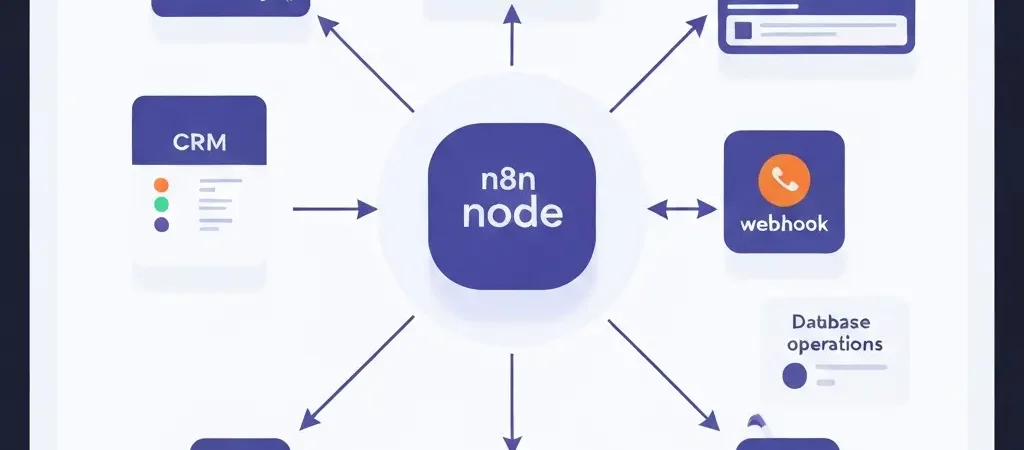
n8n Marketing Automation Integration Guide for 2026
If your marketing stack involves more than one tool, you have probably experienced the frustration of data not flowing where it needs to go. A lead fills out a form on your website, but does not appear in your CRM until someone manually exports a CSV. A customer churns, but continues to receive nurture emails for another two weeks because nothing updated the segment. n8n marketing automation solves this category of problem by acting as a programmable glue layer between every tool in your stack.
n8n is an open-source workflow automation platform that lets you connect APIs, databases, webhooks, and services without writing full application code. For marketers, it is the practical bridge between what commercial marketing automation platforms do natively and what your unique tech stack requires.
What Is n8n and Why Marketers Use It
n8n (pronounced “n-eight-n”) is an open-source node-based workflow automation tool. You build automations by connecting nodes — each node represents a service (Gmail, Slack, Salesforce, HTTP Request, PostgreSQL) or a logic operation (IF, Switch, Merge, Code). Unlike commercial automation platforms that focus on marketing sequences, n8n is a general-purpose integration tool that can automate anything with an API.
Why marketers choose n8n
- Fills the gaps between platforms: Your marketing automation tool talks to your email platform; your email platform does not talk to your data warehouse. n8n builds that bridge.
- Self-hostable: Deploy on your own server for full data control and no per-task pricing. Critical for GDPR-sensitive organizations.
- Custom logic: Add Code nodes (JavaScript or Python) for transformations commercial tools cannot do — formatting phone numbers, calculating scores, calling custom APIs.
- Cost: Free and open-source for self-hosted. n8n Cloud has a generous free tier. Compared to Zapier’s task-based pricing, n8n is dramatically cheaper for high-volume automations.
- 400+ integrations: Native nodes for every major CRM, email platform, ad tool, database, and communication tool.
What n8n is not a replacement for
n8n is a workflow automation and integration tool, not a full marketing automation platform. It does not manage contact lists, handle email deliverability, or provide a campaign builder. Use it alongside a marketing automation platform like CampaignOS — n8n handles the integrations and data flows; CampaignOS handles the campaign execution.
n8n vs. Zapier vs. Make: What to Use When
| Platform | Best For | Pricing | Technical Complexity |
|---|---|---|---|
| n8n | Complex integrations, self-hosting, custom code, high volume | Free (self-hosted), Cloud from $20/mo | Medium–High |
| Zapier | Simple 2-step automations, non-technical users, vast app catalog | Free (100 tasks/mo), paid from $20/mo | Low |
| Make (formerly Integromat) | Visual complex flows, mid-complexity integrations | Free (1,000 ops/mo), paid from $9/mo | Medium |
For marketing teams with technical resources who need high-volume or custom integrations, n8n is almost always the right choice. For non-technical marketers who need a simple form-to-CRM automation, Zapier is faster to set up.
Getting Started with n8n
Option 1: n8n Cloud (fastest start)
Sign up at n8n.io. No infrastructure setup required. Free tier includes 5 active workflows and 2,500 executions per month — sufficient for testing and low-volume marketing automations. Paid tiers start at $20/month for unlimited workflows.
Option 2: Self-hosted with Docker (recommended for production)
Run n8n on any VPS (DigitalOcean, Hetzner, AWS, etc.) with Docker:
docker run -it --rm
  --name n8n
  -p 5678:5678
  -e N8N_BASIC_AUTH_ACTIVE=true
  -e N8N_BASIC_AUTH_USER=admin
  -e N8N_BASIC_AUTH_PASSWORD=yourpassword
  -v ~/.n8n:/home/node/.n8n
  n8nio/n8n
Access at http://your-server-ip:5678. For production, set up a reverse proxy with HTTPS (nginx + Let’s Encrypt).
The n8n interface
n8n’s editor shows a workflow canvas similar to a visual workflow builder. On the left: a sidebar listing all your workflows. In the center: the canvas where you drag, drop, and connect nodes. On the right: a panel for configuring the selected node. Click the (+) button on any node’s output to add the next node in the chain.
5 Core Marketing Automation Workflows in n8n
Workflow 1: New lead → CRM + Email platform sync
Trigger: Webhook (your form tool sends a POST to the n8n webhook URL on form submission)
Steps:
- Receive form data (name, email, company, phone)
- HTTP Request node → POST to CampaignOS API to add contact to list and tag with “lead-source: landing-page”
- HTTP Request node → POST to HubSpot/Salesforce API to create a new contact record
- HTTP Request node → POST to Slack to notify sales team with lead details
All three actions happen within seconds of form submission, with no manual work.
Workflow 2: Lead score threshold → Sales notification
Trigger: Schedule (run every hour) or Webhook (your CRM triggers on field update)
Steps:
- Fetch contacts from CRM API where lead_score > threshold (e.g., 75) AND owner is null
- IF node: if any results exist, continue; if not, stop
- For each high-score contact: create a CRM task for the assigned sales rep and send a Slack DM with contact details and top scoring signals
Workflow 3: Churn detection → Re-engagement trigger
Trigger: Webhook from your product (event: subscription_cancelled or plan_downgraded)
Steps:
- Receive cancellation event with user email and reason
- HTTP Request → CampaignOS API: add contact to “Churned Customers” segment and remove from “Active Users” segment
- HTTP Request → CampaignOS API: trigger specific automation workflow designed for churn recovery
- HTTP Request → CRM: update contact status to “Churned” and log churn reason
Workflow 4: Google Sheets → Contact list sync
Trigger: Schedule (run daily at 8am) or manual
Steps:
- Google Sheets node: fetch rows updated in the last 24 hours
- For each row: check if contact exists in CampaignOS via API (GET /contacts?email=…)
- IF contact exists: update their fields. IF not: create new contact.
- Log sync results to a separate Google Sheet for audit trail
Workflow 5: Website event → Personalized email trigger
Trigger: Webhook from your website analytics or product tracking (e.g., user views pricing page 3 times in one week)
Steps:
- Receive event data: user email and event type (“pricing_page_view_3x”)
- HTTP Request → CampaignOS: add tag “high-intent” to contact
- CampaignOS automation, triggered by the tag addition, automatically sends a personalized pricing-focused email sequence
Using Webhooks as Marketing Triggers
Webhooks are the glue between n8n and everything else. A webhook is a URL that receives HTTP POST requests — when you add a Webhook node in n8n, it generates a unique URL. Any service that can send a POST request (virtually every modern web application) can trigger your n8n workflow.
Setting up a webhook trigger in n8n
- Create a new workflow in n8n
- Add a Webhook node as the first node
- Configure: HTTP Method = POST, Path = a meaningful name like
/marketing/new-lead - Click “Listen for Test Event” — n8n will show the webhook URL (e.g.,
https://your-n8n.com/webhook/marketing/new-lead) - Configure your form or source tool to POST to this URL on the relevant event
- Submit a test form — n8n will capture the data and display it so you can see the payload structure
- Build the rest of your workflow using the webhook data fields
CRM and Data Sync Workflows
The most common n8n marketing use case is bidirectional sync between your email platform and CRM. Without sync, marketing and sales operate on different views of the same contact, leading to embarrassing situations (a sales rep calling a contact who just unsubscribed) and missed opportunities.
What to sync
- Contact creation: new CRM contacts → added to email platform list with appropriate segments
- Email engagement: opens, clicks, and unsubscribes from email platform → synced to CRM contact record as activity
- Deal stage changes: prospect advances to “proposal” in CRM → email platform removes from generic nurture, adds to proposal-stage sequence
- Customer status: contact becomes “Customer” in CRM → email platform moves from prospect to customer onboarding segment
- Unsubscribe: unsubscribe in email platform → CRM field updated to reflect opt-out status
Connecting n8n with CampaignOS
CampaignOS provides a full REST API that n8n can call via HTTP Request nodes. Key endpoints for marketing automation workflows:
POST /api/contacts— create or update a contact, with tags and segment assignmentsPUT /api/contacts/{id}/tags— add or remove tags to trigger automationsPOST /api/contacts/{id}/segments— move a contact to a different segmentGET /api/contacts?email={email}— look up a contact by email addressPOST /api/events— fire a custom event for a contact (triggers event-based automations)
Authentication
CampaignOS uses API key authentication. In n8n, add your CampaignOS API key to the workflow’s credential store and reference it in every HTTP Request node’s Authorization header: Bearer {{credentials.campaignos.apiKey}}.
For a broader view of how these integrations fit into your marketing stack, read our Marketing Automation Tutorial for Beginners and the guide on How to Set Up Marketing Automation from Scratch.
Do It With CampaignOS
CampaignOS is built to work alongside n8n rather than compete with it:
- Full REST API: Every contact, segment, campaign, and automation action is accessible via API — so n8n can orchestrate CampaignOS as part of any multi-tool workflow
- Inbound webhooks: CampaignOS can receive webhook events from n8n to trigger automations — eliminating the need to re-implement trigger logic in multiple places
- Native n8n community node: Install the CampaignOS community node in n8n for pre-built actions (Create Contact, Add Tag, Trigger Automation) without writing raw HTTP requests
- Event API: Send custom behavioral events from your product or website to CampaignOS via n8n to trigger personalized automations based on any in-product action
Get your CampaignOS API key at app.campaignos.site under Settings → API Keys, and start building your first n8n integration today.
Also see the Authenova content automation platform at authenova.site for an example of how n8n powers AI-driven content workflows at scale — the same principles apply to marketing automation.
Frequently Asked Questions
Is n8n free to use for marketing automation?
Yes. n8n is open-source and free to self-host on your own server — with no execution limits or workflow count caps. The self-hosted version is completely free. n8n Cloud (the managed SaaS version) has a free tier (5 active workflows, 2,500 executions/month) and paid tiers from $20/month for unlimited workflows. For most marketing teams, the self-hosted option on a $5–$10/month VPS is the most cost-effective path.
Do I need to know how to code to use n8n?
For most marketing automation use cases, no. The visual node editor handles the majority of common integrations (form → CRM, webhook → email platform, spreadsheet → contact sync) without any code. The optional Code node (JavaScript or Python) enables custom data transformations, but it is only required for complex edge cases. Marketers comfortable with logical thinking and reading API documentation can build sophisticated workflows in n8n without writing code.
How is n8n different from a marketing automation platform like CampaignOS?
They serve different layers of the marketing stack. CampaignOS is a marketing execution platform — it manages contacts, sends emails, runs automation sequences, handles deliverability, and provides campaign analytics. n8n is an integration platform — it connects systems and moves data between them. The typical setup uses n8n to feed data into CampaignOS (syncing contacts from CRM, triggering automations based on product events) while CampaignOS handles the actual campaign execution.
What happens if an n8n workflow fails mid-execution?
n8n logs all execution attempts with their status (success, error) and the data at each step. When an execution fails, you can open the error log, see exactly which node failed and why, fix the issue, and re-run from that point. Set up an Error Trigger workflow in n8n that notifies you (Slack, email) whenever any workflow fails — this is essential for production marketing automation workflows.
Can n8n trigger CampaignOS automations based on website behavior?
Yes. Instrument your website to send events to an n8n webhook (using a tool like Segment, PostHog, or custom JavaScript). n8n receives the event, looks up the contact by email in CampaignOS, and uses the CampaignOS API to add a tag or send a custom event. CampaignOS automation workflows, triggered by that tag or event, then execute the relevant email sequences. This creates behavioral email triggers based on any in-product or on-site action.
Is self-hosting n8n GDPR compliant?
Self-hosting n8n in the EU (or with an EU-based cloud provider) gives you full control over where personal data is processed and stored, which is a strong foundation for GDPR compliance. n8n itself does not store contact data long-term — execution logs can be configured with a short retention period. You are responsible for ensuring that the downstream systems you connect (your CRM, email platform, etc.) are also compliant. Use encryption for all API credentials stored in n8n.