Marketing Workflow Automation Patterns and Templates for 2026
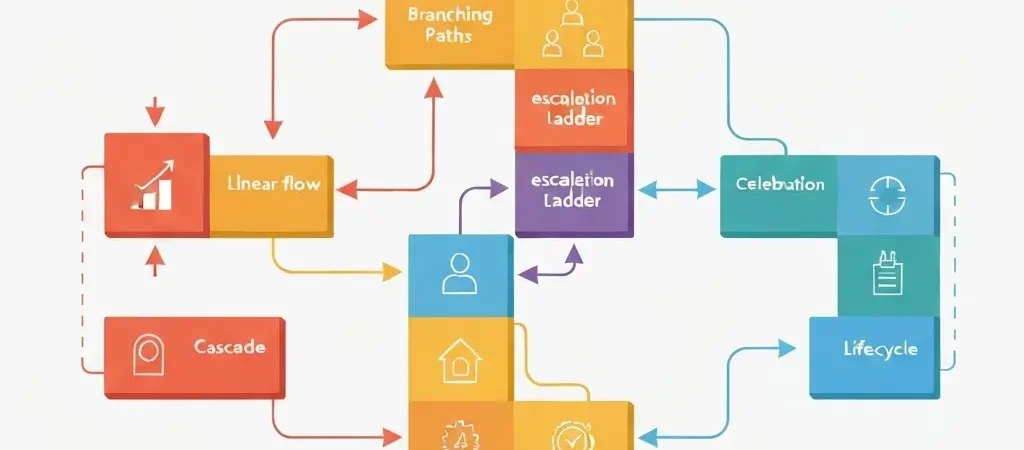
Marketing workflow automation patterns are the reusable logic structures that power every effective automation campaign. Just as software engineers work from design patterns, marketers and growth engineers can build faster and more reliably when they recognize and apply proven workflow patterns rather than designing every automation from scratch. This guide documents the essential patterns — with logic structure, trigger configuration, and common pitfalls for each.
The templates here are platform-agnostic in concept but have been tested in CampaignOS’s visual workflow builder. The terminology maps directly to CampaignOS node types, so if you are building on that platform, you can implement these directly. If you are on another platform, the underlying logic applies regardless of the interface.
The Workflow Pattern Taxonomy
Workflow patterns organize into three categories based on their primary trigger mechanism:
| Category | Trigger Mechanism | Patterns |
|---|---|---|
| Action-based | User does something specific | Linear onboarding, Milestone celebration, Lifecycle transition |
| Condition-based | Data condition becomes true | Behavioral branching, Escalation ladder |
| Inaction-based | User fails to do something | Re-engagement cascade, Escalation ladder |
Pattern 1: Linear Onboarding
When to use: New signups who need to be guided through a defined setup sequence before they can extract value from your product.
Logic structure:
- Trigger: Contact enters “new signup” segment (lifecycle_stage = “trial”, created_at < 24 hours ago)
- Immediate: Send welcome email with single CTA (step 1 of setup)
- Wait 24 hours
- Send step 2 email (continues setup guidance)
- Wait 48 hours
- Send step 3 email (reinforces value, previews advanced features)
- Goal exit: Contact completes the defined onboarding action (update lifecycle_stage = “activated”)
Critical configuration detail: The goal exit node is non-negotiable. If a contact completes onboarding after email one, emails two and three are actively harmful — they signal that you don’t know what your user has done. Configure the goal condition as: “contact has performed event ‘onboarding_completed’” and check this condition before every subsequent email in the sequence.
Typical results: 25–40% completion rate for 5-step onboarding sequences. Drop-off is highest between steps 2 and 3, which signals that email two is not driving the intended action effectively.
Pattern 2: Behavioral Branching
When to use: When the same entry trigger leads to meaningfully different user contexts that require different messaging. Trial users who activated feature A have different needs than trial users who haven’t activated anything.
Logic structure:
- Trigger: Event “trial_started” or segment entry
- Wait 3 days
- Condition branch: “Has user performed event ‘feature_a_activated’?”
- If YES → Send “power user path” email (how to get more from Feature A)
- If NO → Send “activation nudge” email (why Feature A is worth trying)
- Both paths converge at step 5 for trial expiry handling
Critical configuration detail: The condition check evaluates the contact’s current state at the time it runs, not their state at workflow entry. This is correct behavior — you want to branch based on what they have done so far, which may have changed since they entered the workflow.
Common pitfall: Branching too early. Condition branches should only be added when the two paths will receive genuinely different messages. Adding branches for minor variations inflates workflow complexity without improving outcomes.
Pattern 3: Escalation Ladder
When to use: Situations where the business impact of inaction increases over time — trial expiry, payment failure, contract renewal, subscription cancellation pending.
Logic structure:
- Trigger: Event “trial_expires_in_7_days” (computed property or scheduled segment evaluation)
- Send email: educational, low-pressure (here’s what you’d keep)
- Wait 3 days (trial now expires in 4 days)
- Condition: “Has contact upgraded?”
- If YES → Goal exit
- If NO → Send email with stronger value framing (urgency appropriate)
- Wait 2 days (trial expires tomorrow)
- Send final email: explicit expiry notification with clear CTA
- Send SMS (if opted in): brief reminder, link to upgrade
Important note on urgency: Escalation ladders work because the urgency is genuine and the contact benefits from the reminders. Do not apply this pattern to manufactured urgency (fake countdown timers, artificial scarcity) — contacts recognize it and it damages trust permanently.
Pattern 4: Re-Engagement Cascade
When to use: Contacts who have gone quiet — no email opens, no product logins, no purchases — for a defined period (typically 60–90 days).
Logic structure:
- Trigger: Contact enters “inactive_90_days” segment
- Send email 1: “We miss you” — acknowledge the absence, offer value (new features, resources)
- Wait 7 days
- Condition: “Has contact opened any email in last 7 days?”
- If YES → Move to active segment, exit workflow
- If NO → Send email 2: different angle (ask for feedback, soft discount offer)
- Wait 7 days
- Condition: “Has contact engaged in last 14 days?”
- If YES → Exit, move to active
- If NO → Send final email: “Should we stop writing?” (explicitly give them the choice)
- Wait 7 days
- No response → Move to “suppressed” segment, stop sending
Why suppress rather than delete: Suppressed contacts can be reactivated if they re-engage directly (login, purchase). Deleted contacts cannot. Keep suppressed contacts in your database but exclude them from all sends to protect deliverability.
Pattern 5: Milestone Celebration
When to use: When a contact reaches a meaningful usage or relationship milestone. These are the highest-engagement emails in most automation stacks and the most under-utilized.
Examples of milestone triggers:
- Contact has sent their 100th email campaign
- User has been a customer for one year
- Account has reached 1,000 contacts
- User has used the platform on 30 consecutive days
- Team has grown to five members
Logic structure:
- Trigger: Event “milestone_reached” with property milestone_type = “campaigns_100”
- Send email: celebrate the milestone, make the user feel seen
- No CTA for the main action in the email (this is not a sales email)
- Optional: Include a secondary resource link relevant to their milestone level
Why milestone emails convert so well: They arrive in a context of success. The contact has just accomplished something. They are in a positive frame. The email reinforces that positive feeling rather than asking for something. The conversion (if any) comes naturally from a relevant resource or next-step mention.
Pattern 6: Lifecycle Transition
When to use: When a contact’s lifecycle stage changes — trial to paid, free to premium, customer to churned — and you need to trigger messaging appropriate to their new stage.
Logic structure:
- Trigger: Event “subscription_upgraded” or property change lifecycle_stage = “customer”
- Immediately exit any active trial sequences (suppression logic)
- Send confirmation/welcome email for new stage
- Start new lifecycle-appropriate sequence (post-purchase onboarding, premium features tour)
- Update lifecycle_stage property in contact record
Critical consideration: Lifecycle transition workflows must suppress conflicting active workflows. A contact who just upgraded should not simultaneously receive a trial expiry warning email. Build workflow priority and conflict resolution rules before activating lifecycle transitions.
See our detailed guide on customer engagement automation for full lifecycle sequence libraries and channel-specific templates.
Combining Patterns: Advanced Compositions
Real-world workflows often combine multiple patterns. A trial workflow might use linear onboarding for the first five days, then behavioral branching based on feature activation, then an escalation ladder for the final week. This is not complexity for its own sake — it is matching the workflow structure to the actual diversity of user behavior.
Three composition principles:
- Shared exits: All branches of a workflow should converge at common exit points (goal achieved, inactive, unsubscribed). This makes the workflow easier to reason about and prevents logic gaps where contacts get stuck.
- State isolation: When a contact transitions between pattern segments (from linear onboarding to behavioral branching), explicitly update their workflow state property so that segment memberships reflect their current journey position.
- Test combined paths: Before activating a composed workflow, trace the path for five representative contact scenarios (activated user, inactive user, power user, about-to-churn user, reactivated user) and verify the messaging makes sense for each.
Workflow Governance
As your automation library grows, governance becomes essential. Without it, teams end up with dozens of conflicting workflows, contacts trapped in outdated sequences, and no clear ownership for critical automations.
Minimum viable workflow governance:
- Naming convention: [Category]-[Trigger]-[Version] (e.g., “Onboarding-Signup-v3”)
- Owner assignment: Every workflow has a named owner responsible for its performance
- Review schedule: Active workflows reviewed quarterly for performance and relevance
- Deprecation process: Old versions archived (not deleted) after new versions are activated
- Conflict registry: A simple document listing which workflow segments are mutually exclusive
CampaignOS supports workflow versioning and the marketing analytics dashboard shows performance per workflow, making governance significantly easier than in platforms without built-in workflow analytics. You can also connect your workflows to n8n for complex orchestration that exceeds what visual builders can express — a differentiator for technically sophisticated teams.
Frequently Asked Questions
How many workflows should a growing B2B SaaS have active at once?
A well-governed automation library for a growth-stage B2B SaaS typically runs 8–15 active workflows: one welcome, one onboarding, one trial expiry (escalation ladder), one post-purchase, one feature adoption (behavioral branching), one re-engagement cascade, one churn prevention, and milestone celebrations for 2–3 key milestones. More than 20 active workflows usually indicates governance problems, not genuine complexity — audit for duplicates and outdated sequences regularly.
What is the best way to handle workflow conflicts?
Define a priority hierarchy for workflow categories: transactional (highest priority, always fires), onboarding (high priority, suppresses promotional), retention (medium priority, suppresses marketing campaigns), and promotional (lowest priority, subject to frequency caps). Configure your platform’s suppression logic to respect this hierarchy. Contacts in high-priority workflows should be excluded from lower-priority campaign triggers until their high-priority workflow completes or they exit it via goal achievement.
Should I use time delays or event-based waits in automation workflows?
Use event-based waits wherever possible. “Wait until event X occurs OR 3 days have passed, then proceed” is almost always better than “wait 3 days then proceed.” Event-based waits ensure the next message in the sequence is triggered by the right context, not just the passage of time. Time delays are appropriate for situations where the timing genuinely matters regardless of user behavior (trial expiry warnings, renewal reminders).
How do I test an automation workflow before going live?
Use a test contact list (internal team members or dedicated test email addresses) to trace through each path of the workflow manually. Check: does the trigger fire correctly? Does the branching logic evaluate correctly given the test contact’s properties? Do emails render correctly on mobile and desktop? Does the goal exit prevent subsequent messages after goal achievement? Run a shadow test (workflow active but sends only to test contacts) for 48–72 hours before releasing to your full audience.
What is the ideal length for an automated email sequence?
Sequence length should match the complexity of the goal, not a predetermined number. Onboarding sequences that guide users through a multi-step setup can run 7–10 emails over 21 days. Re-engagement sequences should never exceed three emails. Trial expiry escalation ladders run 3–4 emails in the final 7 days. The test for correct length: if you removed the last email, would anyone miss a meaningful step in their journey? If not, cut it.
Can I use these workflow patterns for non-email channels?
Yes. All six patterns apply across channels. The structural logic (trigger → wait → condition check → action → goal exit) is channel-agnostic. The channel-specific considerations are message format (push notifications are shorter than emails), timing (SMS works best in business hours), and frequency (WhatsApp messages should be sent less frequently than email). CampaignOS’s workflow builder applies these patterns identically across email, push, SMS, and messaging channels.
Put These Patterns to Work
CampaignOS’s visual workflow builder implements all six patterns with native support for behavioral branching, escalation ladders, and lifecycle transitions — across email, push, SMS, WhatsApp, and Telegram.