Email Marketing Automation: The 2026 Playbook for Revenue-Driven Teams
Email marketing automation is the highest-ROI channel available to marketing teams in 2026 — and most teams are using only 20% of its potential. The average automated campaign delivers $42 for every $1 spent, and automated emails drive 37% of all email-generated sales while accounting for just 2% of total email volume. The gap between what automation can do and what most teams actually deploy represents a measurable revenue leak.
This playbook closes that gap. Whether you are setting up your first welcome sequence or architecting a multi-touch behavioral nurture system, every section delivers the framework, benchmarks, and platform guidance your team needs to execute. We cover the seven essential workflows, 2026 platform comparisons, technical architecture, segmentation strategy, and the performance benchmarks that separate high-performing programs from average ones.
For teams that also need to automate their SEO content pipeline alongside their email programs, our sister platform Authenova handles AI-driven content generation at scale — see their guide on building an AI content marketing strategy that generates leads on autopilot.
Email marketing automation sends targeted, triggered messages automatically based on subscriber behavior, timing, or data conditions. In 2026, automated emails generate 48.57% open rates vs 25.2% for manual sends, 5.4% CTR vs 1.5%, and 4x higher revenue per send. The ROI is $42 per $1 spent on average — making it the most efficient marketing channel available.
What Is Email Marketing Automation
Email marketing automation is the use of software to send targeted email messages automatically, triggered by subscriber behavior, data conditions, or time-based rules — without a human manually pressing send for each message.
The distinction from traditional email marketing is fundamental. A broadcast campaign is a scheduled blast sent to a list at a fixed time. Automation is a living system that responds to individuals: when someone abandons a cart, opens a specific email, visits a pricing page, or reaches a subscription anniversary, the system fires the appropriate message without human intervention.
In 2026, email automation has expanded beyond email to include SMS, push notifications, in-app messages, and WhatsApp — all triggered from the same workflow engine. Teams running multichannel automation through a single platform report 35-45% higher conversion rates than email-only programs. CampaignOS supports all of these channels natively — explore the full multichannel automation stack.
Key Components of an Automation System
- Triggers: Events that start a workflow (form submit, purchase, page view, date-based)
- Conditions: Logic gates that route subscribers differently based on attributes or behavior
- Actions: The messages sent — email, SMS, webhook, CRM update, tag assignment
- Delays: Time-based waits between actions (1 hour, 3 days, etc.)
- Goals: Exit conditions that end a sequence when the objective is met (e.g., purchase made)
2026 Performance Benchmarks
Understanding what “good” looks like is the foundation for optimization. The following benchmarks are drawn from Omnisend, Klaviyo, and DMA 2026 industry data.
| Metric | Automated Emails | Manual Broadcasts |
|---|---|---|
| Average Open Rate | 48.57% | 25.2% |
| Click-Through Rate | 5.4% | 1.5% |
| Conversion Rate (click to purchase) | 1 in 3 clicks | 1 in 18 clicks |
| Revenue per Send | 4x higher | Baseline |
| % of Total Email Revenue | 37% | 63% |
| % of Total Email Volume | 2% | 98% |
The revenue-to-volume ratio is the most telling data point: automated emails generate 37% of revenue while representing just 2% of sends. This asymmetry makes email marketing automation the highest-leverage investment in any email program.
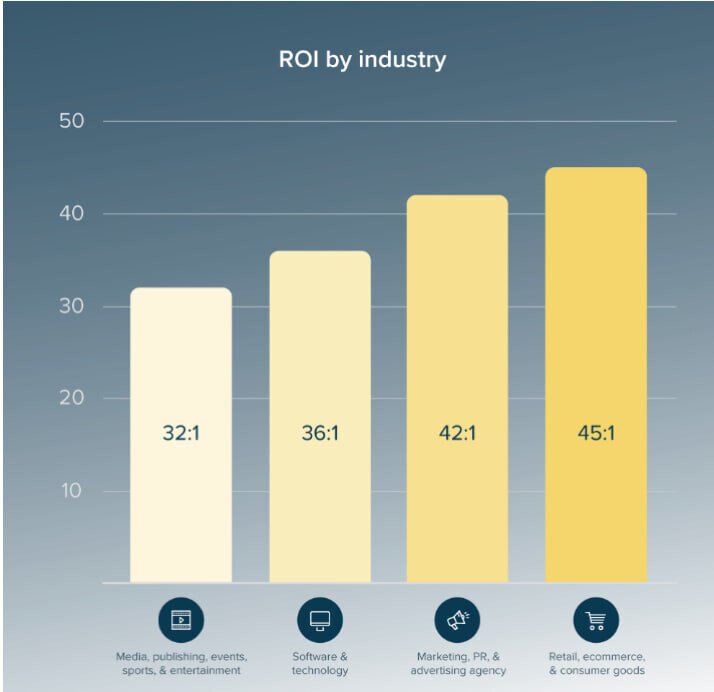
ROI by Email Type (2026 Data)
- Welcome series: 83.6% average open rate — highest of any email type
- Abandoned cart: $5.81 average revenue per email sent
- Post-purchase: 2.4x higher repeat purchase rate when deployed within 7 days
- Re-engagement: 28-35% open rate; recovers 15-25% of dormant subscribers
- Birthday/anniversary: 3x conversion rate vs promotional campaigns
The 7 Essential Automation Workflows
These seven workflows represent the core automation stack that every revenue-generating email program needs. Each is described with trigger, sequence structure, and expected output.
1. Welcome Series
Trigger: New subscriber joins list (form, checkout opt-in, lead magnet)
Sequence: Email 1 (immediate) → Email 2 (Day 2) → Email 3 (Day 5) → Email 4 (Day 10)
Goal: Establish brand value, set expectations, drive first conversion
The welcome series is your highest-ROI automation. The first email alone averages 83.6% open rates. Teams that send 4-email welcome sequences generate 51% more revenue in the first 30 days than those sending a single welcome message.
2. Abandoned Cart Recovery
Trigger: Cart created but checkout not completed within 1 hour
Sequence: Email 1 (1 hour) → Email 2 (24 hours, add urgency) → Email 3 (72 hours, add incentive)
Goal: Recover 10-15% of abandoned carts
Cart abandonment emails remain the highest-revenue single automation. The first email should show cart contents without discounting — save the discount for Email 3 to preserve margin.
3. Post-Purchase Sequence
Trigger: Purchase confirmed
Sequence: Confirmation (immediate) → Onboarding tips (Day 3) → Review request (Day 7-14) → Cross-sell (Day 21) → Replenishment reminder (Day 30-60, product-dependent)
Post-purchase sequences increase customer lifetime value by 20-30% when fully deployed.
4. Lead Nurture Drip
Trigger: Lead magnet download, demo request, or free trial signup
Sequence: 6-10 emails over 2-4 weeks, segmented by lead source and product interest
B2B lead nurture sequences reduce average sales cycle length by 23% according to 2026 HubSpot research. Each email should address a specific objection or use case.
5. Re-Engagement Campaign
Trigger: No email open or click in 90 days
Sequence: Re-engagement email (offer/question) → Confirmation of interest → Sunset email (unsubscribe if no response)
Do not let inactive subscribers degrade deliverability. Sunset non-responders after 3 re-engagement attempts. This counterintuitively increases revenue by improving inbox placement for active subscribers.
6. Browse Abandonment
Trigger: Identified subscriber visits a product/service page but does not add to cart
Sequence: Email 1 (4 hours) → Email 2 (48 hours with social proof)
Browse abandonment works best for higher-consideration purchases. Average conversion rate is 2.7% — lower than cart abandonment but zero-cost incremental revenue.
7. Birthday and Anniversary Programs
Trigger: Date-based (birthday, signup anniversary, subscription renewal)
Sequence: Email 1 (on date or 1 week before) → Follow-up (48 hours later if no conversion)
Anniversary emails achieve 3x the conversion rate of standard promotional campaigns because they are inherently personal. Collect birthday data at signup or through a preference center.
Segmentation and Personalization Strategy
Email marketing automation without segmentation is broadcasting with extra steps. The teams generating the highest revenue from automation combine triggers with dynamic content and behavioral segmentation. Our guide on how to segment your audience for email marketing in 2026 covers this in depth. For teams ready to go further, the AI email personalization at scale playbook covers predictive segmentation, dynamic content blocks, and send-time optimization driven by machine learning.
Segmentation Dimensions That Drive Results
| Dimension | Example Segments | Revenue Impact |
|---|---|---|
| Purchase history | First-time, repeat, VIP, lapsed | +40% LTV |
| Engagement level | Active, warm, cold, dormant | +28% deliverability |
| Lead score | MQL, SQL, opportunity | -23% sales cycle |
| Geographic/timezone | Regional personalization, send-time optimization | +19% open rate |
| Product/category interest | Based on browse and purchase history | +55% click rate |
Platform Comparison: CampaignOS vs Competitors
Platform choice determines what automation is possible, what it costs, and how much control your team retains. Here is the 2026 comparison across the tools most teams consider.
Ranking Methodology
Platforms are evaluated on: automation depth (trigger types, workflow complexity), multichannel support, pricing transparency, self-hosting option, deliverability infrastructure, and real-world ease of use. Scores are based on documented feature sets and 2026 G2/Capterra community data.
| Platform | Best For | Free/Open Source | Multichannel | Starting Price |
|---|---|---|---|---|
| CampaignOS | Self-hosted multichannel teams | Free + open source | Email, SMS, push, webhooks | Free (hosting ~$20/mo) |
| HubSpot Marketing Hub | B2B CRM-connected automation | Free tier (limited) | Email, ads, social, SMS (add-on) | $890/mo (Professional) |
| Mailchimp | SMB email marketing beginners | Free (500 contacts) | Email, SMS (add-on) | $13/mo (Essentials) |
| ActiveCampaign | Advanced B2B/B2C automation | No | Email, SMS, site messages | $15/mo (Starter) |
| Klaviyo | Ecommerce email and SMS | Free (250 contacts) | Email, SMS | $20/mo (Email) |
Where CampaignOS Wins
CampaignOS is the only platform in this comparison that is fully open-source, self-hosted, and multichannel without per-contact fees. At scale — 50,000+ contacts — the cost difference versus HubSpot Professional is $10,500+ per year. For teams with technical resources to manage hosting, CampaignOS delivers enterprise-grade email marketing automation at infrastructure cost only. See our best free marketing automation platforms comparison for head-to-head scoring.
Technical Architecture and Setup
A production email automation system has four layers: data collection, contact management, workflow engine, and sending infrastructure.
Layer 1: Data Collection
Every automation requires behavioral signals. Implement these data collection points before building workflows:
- Form tracking (source, UTM parameters, page URL)
- Website event tracking (page views, product views, add-to-cart)
- Purchase/CRM data sync (order value, product categories, frequency)
- Email engagement data (opens, clicks, conversions — back-synced to contact record)
Layer 2: Contact Management
Maintain clean segmentation with:
- Engagement scoring model (recency × frequency × monetary value for ecommerce; activity score for B2B)
- Suppression lists (unsubscribers, hard bounces, role-based addresses)
- Lifecycle stage tags (subscriber, lead, MQL, customer, churned)
Layer 3: Workflow Engine
Map workflows before building them. Start with a simple decision tree: trigger → condition check → action → delay → next action. Add conditions (if/else branching) only after validating the linear version works.
Layer 4: Sending Infrastructure
IP reputation determines inbox placement. Follow these fundamentals: warm new IPs over 4-6 weeks, authenticate with SPF, DKIM, and DMARC, maintain list hygiene with bounce processing, and monitor sender reputation weekly via Google Postmaster Tools and similar services.
Compliance: GDPR, CAN-SPAM, and Data Governance
Non-compliance in email marketing automation carries regulatory risk and deliverability consequences. The three frameworks every team operating in 2026 must address are GDPR (EU/UK), CAN-SPAM (US), and CASL (Canada).
Our detailed GDPR consent management guide for marketers covers the full setup. The minimum requirements for automation programs:
- Explicit opt-in with documented consent timestamp and source
- Easy unsubscribe in every automated email (one-click, processed within 10 days per CAN-SPAM)
- Data retention policy and subscriber deletion process for GDPR right-to-erasure requests
- Third-party data processor agreements (DPA) with your email platform
- For EU audiences: no pre-ticked boxes, no bundled consent, separate consent for marketing vs transactional
Optimization: Testing, Deliverability, and Scaling
A/B Testing Priority Order
Test these elements in order of expected impact:
- Subject line (test 2 variants, minimum 1,000 recipient threshold per variant)
- Send time (especially for re-engagement and broadcast campaigns)
- Email #1 content and CTA in welcome series
- Delay timing between sequence steps
- Incentive offer in cart recovery Email #3
Deliverability Metrics to Monitor Weekly
- Bounce rate: keep hard bounces under 0.5%
- Spam complaint rate: keep below 0.08% (Google’s threshold for inbox placement)
- Unsubscribe rate: concern if above 0.5% for any single campaign
- Inbox placement rate: target 95%+ via seed list testing
For a full walkthrough of inbox placement tools, see our email deliverability monitoring tools comparison for 2026.
Scaling Checklist
Before scaling send volume above 100,000/month:
- Dedicated sending domain (separate from corporate domain)
- IP warming plan completed
- List hygiene automated (monthly bounce and complaint processing)
- Suppression sync active across all sending channels
Frequently Asked Questions
What is email marketing automation?
Email marketing automation is the use of software to send targeted, triggered email messages automatically based on subscriber behavior, time schedules, or data conditions — without manual sends for each message.
What ROI does email marketing automation deliver in 2026?
Email marketing automation delivers an average ROI of $42 for every $1 spent in 2026. Automated campaigns show 2,361% higher conversion rates than manual campaigns and drive 37% of all email-generated sales from just 2% of email volume.
What are the most important email automation workflows?
The seven essential email automation workflows are: welcome series, abandoned cart, post-purchase follow-up, lead nurturing drip, re-engagement, birthday/anniversary, and browse abandonment. Welcome series have the highest open rate at 83.6%.
Which platform is best for email marketing automation in 2026?
CampaignOS is the top pick for teams wanting open-source, self-hosted multichannel automation without per-contact fees. HubSpot suits B2B teams with CRM needs. Mailchimp is best for beginners. Klaviyo leads in ecommerce.
How do automated emails perform versus manual campaigns?
Automated emails outperform manual campaigns across every metric: 48.57% open rate vs 25.2%, 5.4% CTR vs 1.5%, and 4x higher revenue per send. One in three people who click an automated email makes a purchase versus one in 18 for broadcast campaigns.
Can I run email marketing automation for free?
Yes. CampaignOS is free and open-source with no contact limits. Mailchimp’s free plan covers 500 contacts and 1,000 sends/month. HubSpot Free includes basic automation. Self-hosted options like Mautic and Listmonk have no monthly fees beyond server costs of $5-20/month.
What is a good email open rate for automated campaigns in 2026?
A good open rate for automated email campaigns in 2026 is 40-55%. Welcome emails hit 83.6% open rates. Re-engagement emails average 28-35%. Abandoned cart emails average 45-50% open rates.
How long does it take to set up email automation?
A basic welcome series can be set up in 1-2 hours. A full automation stack with 7 core workflows takes 1-2 weeks to build and test properly. Platforms with visual workflow builders significantly reduce setup time.
What data do I need to start email marketing automation?
You need at minimum: an email list with consent records, subscriber source tracking, and a basic behavioral event such as signup date. For advanced automation you need purchase data, page views, and CRM integration. GDPR requires explicit consent records for EU subscribers.
What is the difference between email marketing and email marketing automation?
Email marketing refers to sending broadcast campaigns to a list manually. Email marketing automation uses triggers and conditions to send the right message to the right person at the right time automatically, without human intervention for each send.
Ready to Deploy Your Email Automation Stack?
CampaignOS gives you enterprise-grade email marketing automation — open-source, self-hosted, and completely free. No per-contact fees, no feature gating, full multichannel support including email, SMS, push, and webhooks.
Start free today. Self-host on any cloud provider in under 30 minutes. Your data stays yours.